

If your store is not yet authorized to accept SNAP EBT, you are missing a payment type that nearly 1 in 8 Americans relies on for food purchases. The good news is that SNAP retailer authorization is a free, online process administered directly by the USDA Food and Nutrition Service (FNS), and most stores that sell food can qualify. This guide walks store owners and operators through every step, from eligibility requirements to what happens after authorization is granted.
Who Can Apply for SNAP Retailer Authorization
SNAP retailer authorization is available to retail food stores, farmers markets, direct-marketing farmers, and certain specialty retailers. Restaurants are generally not eligible, with limited exceptions in states that run a Restaurant Meals Program for elderly, homeless, or disabled individuals.
To qualify as a retail food store, your location must meet one of two stocking or sales criteria set by the USDA FNS. These are known as Criterion A and Criterion B, and they determine whether your store carries enough food product to serve as a legitimate point of access for SNAP households.
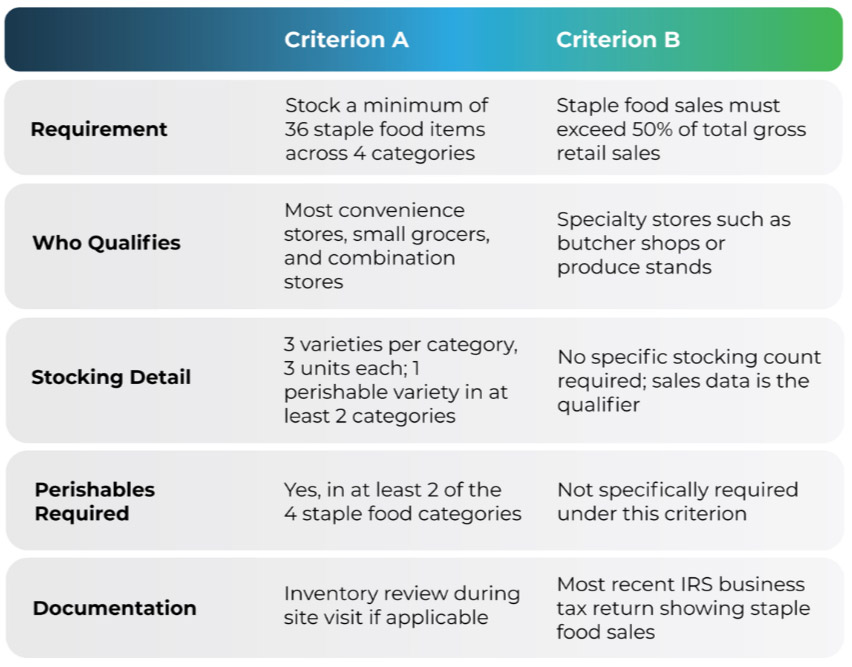
The majority of convenience stores, small grocery stores, and combination stores qualify under Criterion A. If your store already carries basic food staples, there is a good chance it meets the minimum stocking threshold. The four staple food categories are vegetables or fruits, meat or protein, dairy products, and breads or cereals. Review the full USDA store eligibility requirements to confirm your store qualifies before applying.
Proposed Stocking Rule Update
In September 2025, the USDA FNS proposed a rule that would increase the required number of staple food varieties from 3 to 7 per category under Criterion A. This proposed rule is not yet in effect and was still under regulatory review as of early 2026. Store owners should monitor FNS updates, as this change would meaningfully raise the stocking threshold if finalized.
What to Gather Before You Start the Application
The FNS application is completed online and can take as little as 15 minutes for straightforward store setups. However, having the right documentation ready before you start will prevent delays. The application times out after 30 days if not submitted, so it is worth preparing in advance.
Documentation and information you will need:
- Store information: Legal business name, physical store address, mailing address if different, phone number, and business email.
- Ownership information: Full name, home address, date of birth, and Social Security Number for all owners, partners, and officers of the business. This applies to every individual with an ownership stake, not just the primary applicant.
- Business structure documentation: Corporate name and address if the store is a private corporation, public corporation, or nonprofit organization.
- Sales data: Actual sales figures from your store’s most recent IRS business tax return if the store has been open under current ownership for more than one year. If the store is newer, an estimate of annual sales is acceptable.
- Bank information: Your store’s business bank name and account details for payment processing purposes post-authorization.
- Photo ID: Copies of valid photo identification for all owners, partners, and officers listed on the application.
A Note on Ownership Disclosure
One of the most common reasons SNAP retailer applications are delayed is incomplete ownership information. Every individual with an ownership interest in the store must be listed, regardless of ownership percentage. Omitting any owner will hold up the process until the information is provided.
The Step-by-Step Application Process
The USDA FNS is the only entity authorized to approve SNAP retailer applications. No third party can grant SNAP authorization on behalf of FNS, and there is no fee to apply. If you are contacted by an outside organization claiming to offer SNAP authorization for a fee, it is not legitimate.
- Create a USDA account. Before accessing the application, you must set up a USDA online account at fns.usda.gov using a valid email address. You will receive a confirmation email within one to two hours. Keep your login credentials in a safe place, as you will need them to check your application status later.
- Complete the online application. Log in and begin the FNS store application (Form FNS-252). You can save your progress and return to it within 30 days, but the application will be automatically deleted after that window closes if it has not been submitted. Use an email address you monitor regularly, as FNS will contact you there if additional information is needed.
- Submit supporting documentation. After submitting the application, you will receive instructions on which supporting documents to provide. This typically includes copies of photo ID, Social Security Number verification for all listed owners, and business sales records. Submit all documentation electronically through the FNS portal.
- Prepare for a possible site visit. As part of the authorization process, FNS may conduct an unannounced site visit to verify your store’s stocking and operations. Site visits are not scheduled in advance. Ensure your shelves reflect the staple food inventory you documented in your application.
- Receive your determination. FNS has up to 45 days from the date a completed application is received to issue a decision. You can check your application status online at any time. If approved, you will receive a SNAP Permit along with a 7-digit FNS Number. If denied, you may reapply after 60 days in most circumstances.
What Happens After Your Store Is Authorized
Once your store receives its SNAP Permit and FNS Number, you are authorized to accept EBT transactions. You cannot accept SNAP EBT before this permit is issued. Here is what comes next:
- Get EBT-capable equipment with goEBT: All SNAP-authorized retailers are required to process transactions through EBT-capable equipment. You do not need to have equipment in place at the time of application, but you must have it operational before accepting your first EBT transaction. Your FNS Number is used when ordering and programming your POS equipment.
- Train your staff: USDA provides training resources for newly authorized retailers. Cashiers should understand which items are SNAP-eligible, how to handle split tender transactions, and how to produce compliant receipts that show the customer’s remaining EBT balance.
- Plan for reauthorization: SNAP authorization must be renewed every five years. FNS will send a reauthorization notice by mail in advance of your expiration date. You will have 30 days to complete the reauthorization application once you receive notice, so acting promptly is important.
Your FNS Number Matters
The 7-digit FNS Number issued with your SNAP Permit is required to set up your EBT processing equipment. Keep this number in a secure and accessible location. It will also be referenced in any future correspondence with FNS, including reauthorization.
Ready to Start Accepting EBT at Your Store?
Getting authorized is the first step. Setting up the right EBT processing solution for your store is the next one. The processor you choose affects your transaction fees, equipment options, reporting capabilities, and how smoothly EBT integrates with the rest of your payment setup.
goEBT works with newly authorized and existing SNAP retailers to get EBT processing up and running quickly, with support for SNAP, OTC benefits, credit and debit, and more through a single integrated platform. Contact one of our experts today to learn what is needed to get your store set up and ready to accept EBT.